

One line in the diff, 25 breaking changes behind it
Between Guava 18.0 and 33.8.0-jre, 25 changes break code compiled against the old version: classes and methods that were removed or changed. Most projects use a few of them, or none. The release notes don't say which ones your code uses, and reading years of them to find out is slow work.
Take this class from a small sample project:
package demo;

import com.google.common.base.Objects;
import com.google.common.collect.ImmutableList;

public class Person {
    private final String name = "Ada";

    @Override
    public String toString() {
        return Objects.toStringHelper(this).add("name", name).toString();   // line 11
    }

    public ImmutableList<String> tags() {
        return ImmutableList.of("a", "b");
    }
}
What happens if you just merge
If the code is compiled again, the build fails on line 11:
Person.java:11: error: cannot find symbol
        return Objects.toStringHelper(this).add("name", name).toString();
                      ^
  symbol:   method toStringHelper(Person)
If code compiled against 18.0 runs with 33.8.0-jre on the class path (a module you didn't rebuild, or a jar someone else built), it fails only when that line runs:
Exception in thread "main" java.lang.NoSuchMethodError: 'com.google.common.base.Objects$ToStringHelper com.google.common.base.Objects.toStringHelper(java.lang.Object)'
	at demo.Person.toString(Person.java:11)
Either way, you find out after the version changed, from a red build or a stack trace.
Ask first
Bumpwise compares the version you use with the new one and looks for each breaking change in your compiled classes. Build the project, then run:
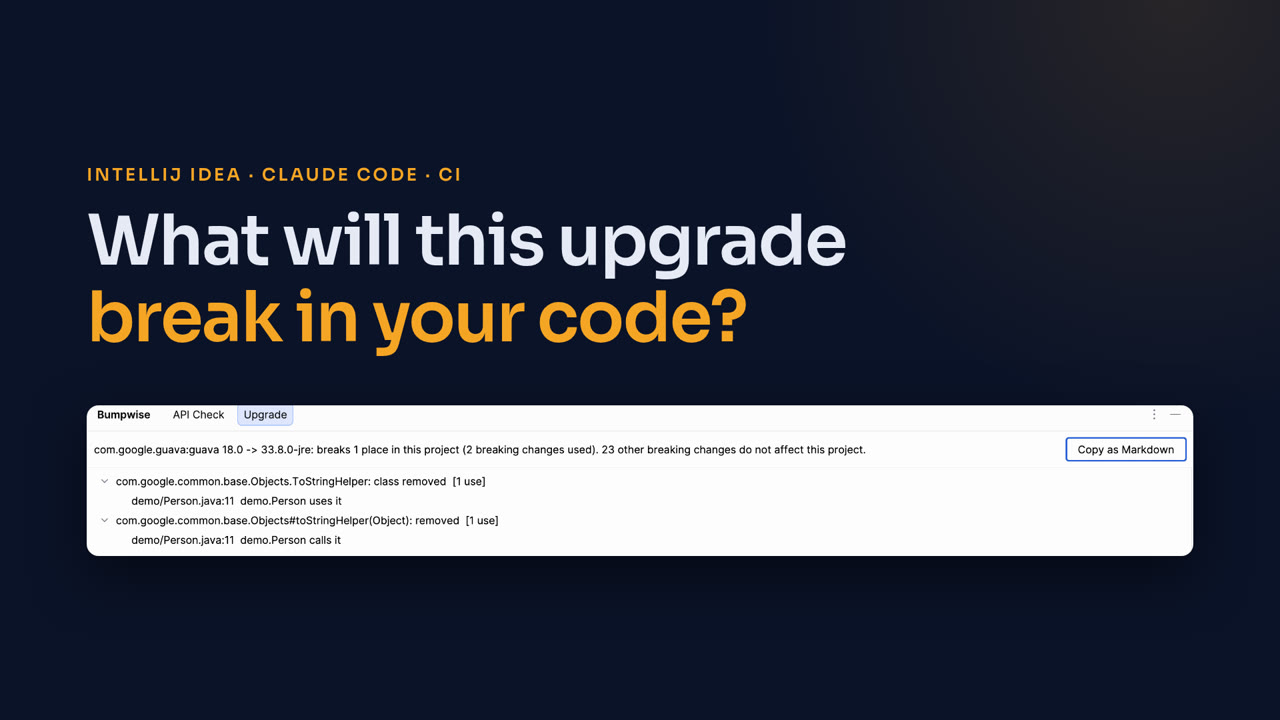
bumpwise upgrade com.google.guava:guavacom.google.guava:guava 18.0 -> 33.8.0-jre: breaks 1 place in this project (2 breaking changes used).
com.google.common.base.Objects.ToStringHelper: class removed
src/main/java/demo/Person.java:11 demo.Person uses it
com.google.common.base.Objects#toStringHelper(Object): removed
src/main/java/demo/Person.java:11 demo.Person calls it
23 other breaking changes in 33.8.0-jre do not affect this project.
Checked the compiled classes: uses through reflection, and code that is not compiled, are not seen.One place breaks. Line 11 calls the removed method Objects.toStringHelper, then calls add and toString on the removed class Objects.ToStringHelper. That's two breaking changes in one place, with one fix: MoreObjects.toStringHelper takes the same arguments. The other 23 breaking changes don't touch this project, so line 11 is the only fix this code needs for Guava's API.
Bumpwise reads the version you use now from pom.xml, build.gradle(.kts) or gradle/libs.versions.toml, downloads both versions and compares their APIs. It finds calls, field reads and writes, classes you create, extend or implement, methods you override, and abstract methods your classes don't implement yet. Exit code 0 means the upgrade is safe for this project, 1 that it breaks places in it, and 2 that Bumpwise could not tell.
Three places to ask
In IntelliJ IDEA. Put the caret on the dependency in pom.xml, a Gradle build file or a version catalog, press Alt+Enter and choose Bumpwise: check upgrade of guava to …. The version then stays marked with what the upgrade breaks. The free edition shows how many places break and opens the first one; Bumpwise Team lists every place and opens each one.
From an AI agent. With the Bumpwise plugin for Claude Code, an agent asked to "upgrade Guava to the latest release" runs the check before it changes the version, then fixes line 11 and builds again. In the video below it does exactly that.
In CI, on every pull request. bumpwise upgrade --changed-since finds every dependency version the pull request changed and checks each one. With --markdown, it writes the result for the job summary or a pull request comment. For a Maven project on GitHub Actions, the free Bumpwise action does it in one step:
on: pull_request
jobs:
  dependencies:
    runs-on: ubuntu-latest
    permissions:
      contents: read
      pull-requests: write
    steps:
      - uses: actions/checkout@v4
        with:
          fetch-depth: 0
      - uses: actions/setup-java@v4
        with:
          distribution: temurin
          java-version: 21
      - uses: gilware/bumpwise-action@v1
        with:
          build: mvn -B -q compile
          comment: true
The action compiles the project with the target branch's build files, so the classes match the versions you use now, and then checks them against the new ones. The job fails when an update breaks your code, and a comment on the pull request lists each place. With Gradle, use build: ./gradlew classes. Bumpwise runs the same check on its own pull requests, Dependabot's included. To run the command line yourself, see the command line page.
What it doesn't see
It reads compiled classes, so it doesn't see uses through reflection, or code that doesn't compile yet. It checks the dependency you upgrade, not the other dependencies the new version brings in. And it checks your classes, not other jars on the class path that were compiled against the old version.
Disclosure: Gilware makes Bumpwise. The command line and the Claude Code plugin are free. In IntelliJ IDEA, the free edition shows how many places an upgrade breaks and the first of them; Bumpwise Team, the paid edition, lists every place and has a 30-day free trial.
How we checked
The sample project and every output on this page are real. On 22 November 2026 we compiled Person.java against Guava 18.0 with OpenJDK 25, ran it with Guava 33.8.0-jre, compiled it again against 33.8.0-jre, and ran the Bumpwise command line 1.1.1 on it. On 26 November, command lines 1.1.2 and 1.1.3 gave the same output. The video was recorded with Bumpwise 1.1.1 in IntelliJ IDEA 2026.3, Claude Code and the command line.
Found a mistake? Write to hello@gilware.com.